


A 2019 NHTSA recall report included 696,097 GMC Sierra vehicles from model years 2014–2018, with production spanning January 29, 2013, through August 31, 2017, according to the NHTSA recall report. That scale makes one parts-counter lesson plain: “GMC Sierra” names a family of trucks, not one universal fit.
For a DIY owner, the wrong handle may refuse to line up. For a shop or fleet, a part that bolts on but doesn't match the truck's equipment can mean extra labor, warning lights, or a repair that still isn't right. The reliable approach is to identify the specific truck first, then match the hardware and any required electronic setup.
Table of Contents
- Why One Sierra Part Rarely Fits Every Truck
- Sierra Part Categories and What Fails First
- How to Confirm Fitment Before You Order
- OEM Aftermarket and CAPA Parts Compared
- When a New Part Still Needs Programming
- How to Replace the Parts Owners Change Most
- Order the Match and Verify the Truck
Why One Sierra Part Rarely Fits Every Truck
Two Sierra recall populations show why a nameplate alone cannot identify a replacement part. One NHTSA campaign involved 153,637 Sierra 1500 trucks from model years 2021–2024 equipped with the 6.2-liter V8, with potentially defective connecting-rod and crankshaft components, as described in the NHTSA recall report. The same report lists another population of 95,284 Sierra 1500 trucks and 28,300 Sierra 2500/3500 trucks from model years 2015–2016. The years, series, engines, and affected components differ. Treat “Sierra parts” as a family of applications, not one shared bin.
Start by identifying which Sierra you have. Generation, model year, 1500/2500/3500 series, engine, cab, production date, and factory option codes can all affect fitment. A rear-door handle may look similar across trucks, yet an extended-cab door and a crew-cab door can require different hardware.
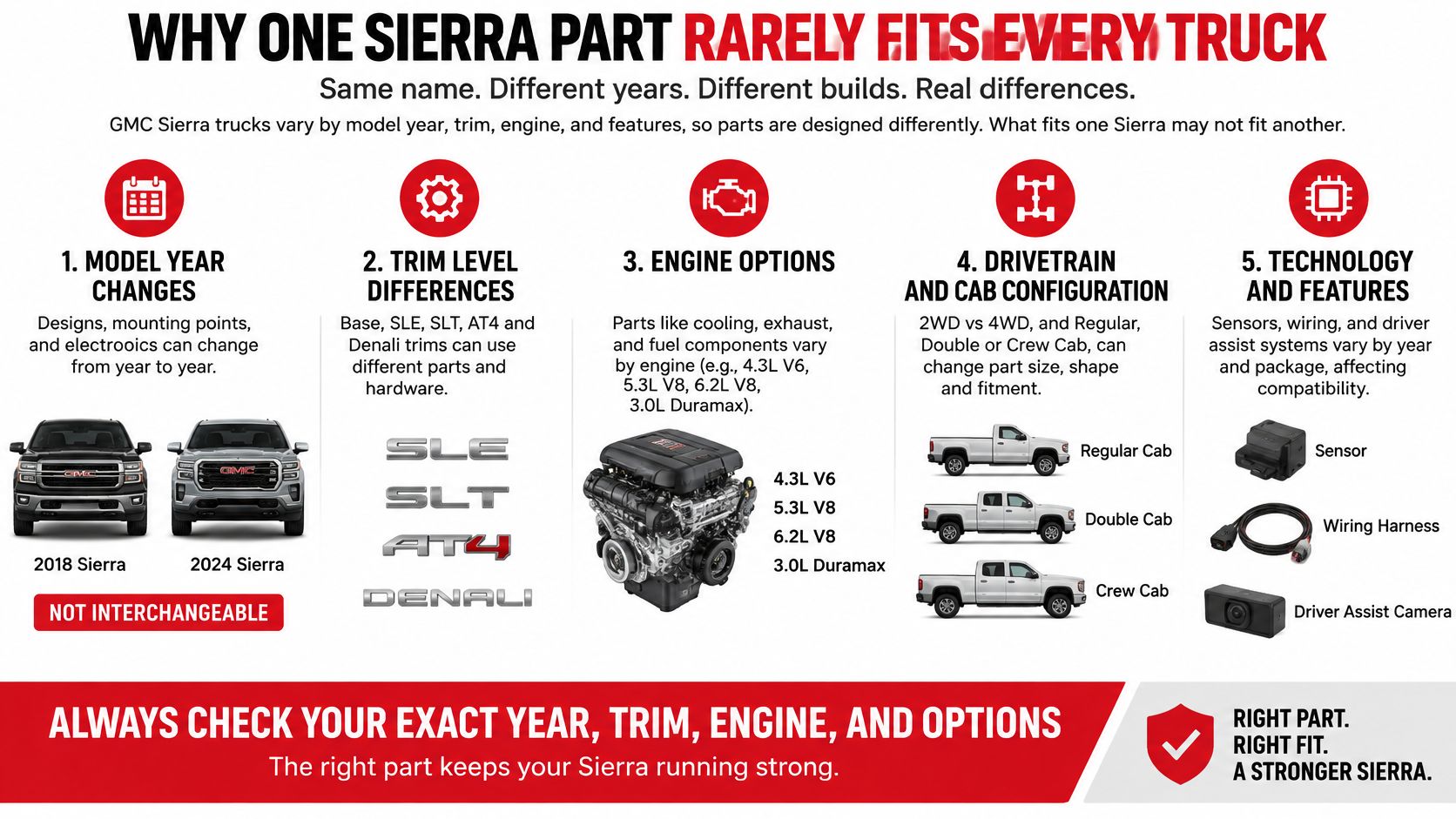
Start with the truck, not the part
Parts catalogs may group GMT800 classics through about 2007, GMT900 and K2XX trucks, and the 2019-up T1 generation. Heavy-duty 2500 and 3500 models add another fitment check. A component listed for a 1500 is not automatically right for an HD truck, even if the exterior looks close.
Cab, door position, and equipment matter too. A mirror with a camera or tow-package features may use a different connector or function than a basic power mirror. The part can bolt on and still leave a feature inoperative, so matching the hardware is only half the job.
A dependable guide to GMC Sierra parts helps you sort categories, verify fitment by VIN, compare replacement choices, recognize when electronics need attention, and approach common hardware jobs safely. For some components, the right option codes and an electronic relearn or calibration are also needed to restore the truck properly.
Sierra Part Categories and What Fails First
| Category | Common failure | Match before ordering | Typical buyer |
|---|---|---|---|
| Exterior door handles | Cracked plastic, broken rods, frozen locks | Side, front or rear, cab style, finish | DIY owners and body shops |
| Interior door handles | Worn pivots on extended-cab rear doors | Cab, door position, left and right | DIY owners |
| Tailgate handles and touchpads | Stiff latch or unexpected unlatch on power-gate HD trucks | Year, power versus manual release, switch versus latch | HD owners and fleets |
| Tailgate cables | Frayed strands or a gate that drops | Left and right pair, generation, bed | DIY owners |
| Side mirrors | Broken glass, dead power, heat, or signal | Power or manual, heated, signal, camera, tow package | Shops and fleets |
| Window regulators | Slow glass or a snapped cable | Power or manual, door, motor included or not | DIY owners and shops |
| Backup cameras | Blank, flickering, or distorted image | Model years, harness, display type | Body shops and owners |
| Lighting and parking sensors | False sensor warnings, cracked housings | Bumper style, finish, sensor count | Fleets and collision shops |
| Brakes and suspension | Heat-checked rotors, worn pads under tow loads | 1500 versus HD, axle, engine, trailering package | Towing owners and shops |
| Powertrain sensors and modules | Warning lights that survive a hardware swap | Engine, RPO codes, whether a relearn is required | Independent shops |
These categories point to common trouble spots, but the table is only a first filter. Handles need to match the side, door position, and cab. Tailgate parts differ depending on whether the truck has a manual release or a powered touchpad. On mirrors, compare the connector and each equipped feature, including heat, signals, camera, and towing functions. A shell that bolts on may still leave the camera opening or wiring wrong.
Material alone does not establish whether a replacement will work better. Factory handles and linkage clips may use plastic that cracks or turns brittle. A metal replacement can resist pulling force, but only when its shape, rod ends, and mounting points match the door. Correct hardware is only half the job: the right generation and options matter too.
Match brakes to the job
Choose brake components for the truck's equipment and workload, not just the Sierra nameplate. GMC documentation identifies the 2018 Sierra 1500 as having power four-wheel ABS, front and rear disc brakes, and Duralife rotors. The 2019 GMC trailering guide lists maximum trailer ratings up to 12,200 lb for a properly equipped next-generation Sierra with the 6.2L V8 and Max Trailering Package.
That rating gives useful context, but it does not identify the correct replacement part by itself. Before ordering rotors, pads, calipers, trailer-brake wiring, or a controller, match the model year, cab and bed, axle ratio, engine, and package. The guide directs owners to the owner's manual for the maximum trailer weight permitted without trailer brakes. Check that limit rather than treating brake compatibility as an accessory detail.
Seat belts require a different kind of care from ordinary trim or latch hardware. If a belt needs professional attention, seat belt service from Safety Restore is one resource to consider.
Camera listings show why a broad year range needs a close read. A backup camera compatible with specified 2016–2019 Chevrolet Silverado and GMC Sierra models, crossing to OEM 84062896 and 590-111 identifies particular model years and configurations. Compare those details with the truck and the existing camera's connector and display setup. A camera can fit physically yet fail to restore the correct image if its connections or system configuration do not match.
How to Confirm Fitment Before You Order
Use a consistent check before ordering, whether you're buying one handle for your own truck or sourcing parts for a shop. A badge or a broad “fits Sierra” claim won't answer every compatibility question.
- Read the VIN. Find the 17-character VIN on the dash or door jamb, then use a vehicle-specific catalog or VIN lookup to confirm the truck. Don't rely on a faded fender badge or a seller's broad model description.
- Write down the series, cab, and bed. Record whether it's a 1500, 2500, or 3500, plus regular, extended, or crew cab and bed length. These details help distinguish parts that look alike but mount differently.
- Confirm the engine. A 6.2L truck isn't a parts match for every Sierra 1500. Engine configuration can affect powertrain parts and related connections, so make sure the catalog identifies the exact engine.
- Check factory option codes. Look for the RPO label in the glovebox and note codes related to towing, chrome, cameras, and power-tailgate equipment. If you can't identify a code, ask the parts seller or shop to decode it before you buy.
- Match the part's physical details. Confirm left or right side, door position, finish, and power versus manual operation. For an electronic part, compare connector shape and pin arrangement as well as mounting points.
- Cross-reference the part number and production date. Compare the number on the original component with the catalog's OEM cross. Check production date if the part changed during a model year, and don't treat a visual resemblance as proof.
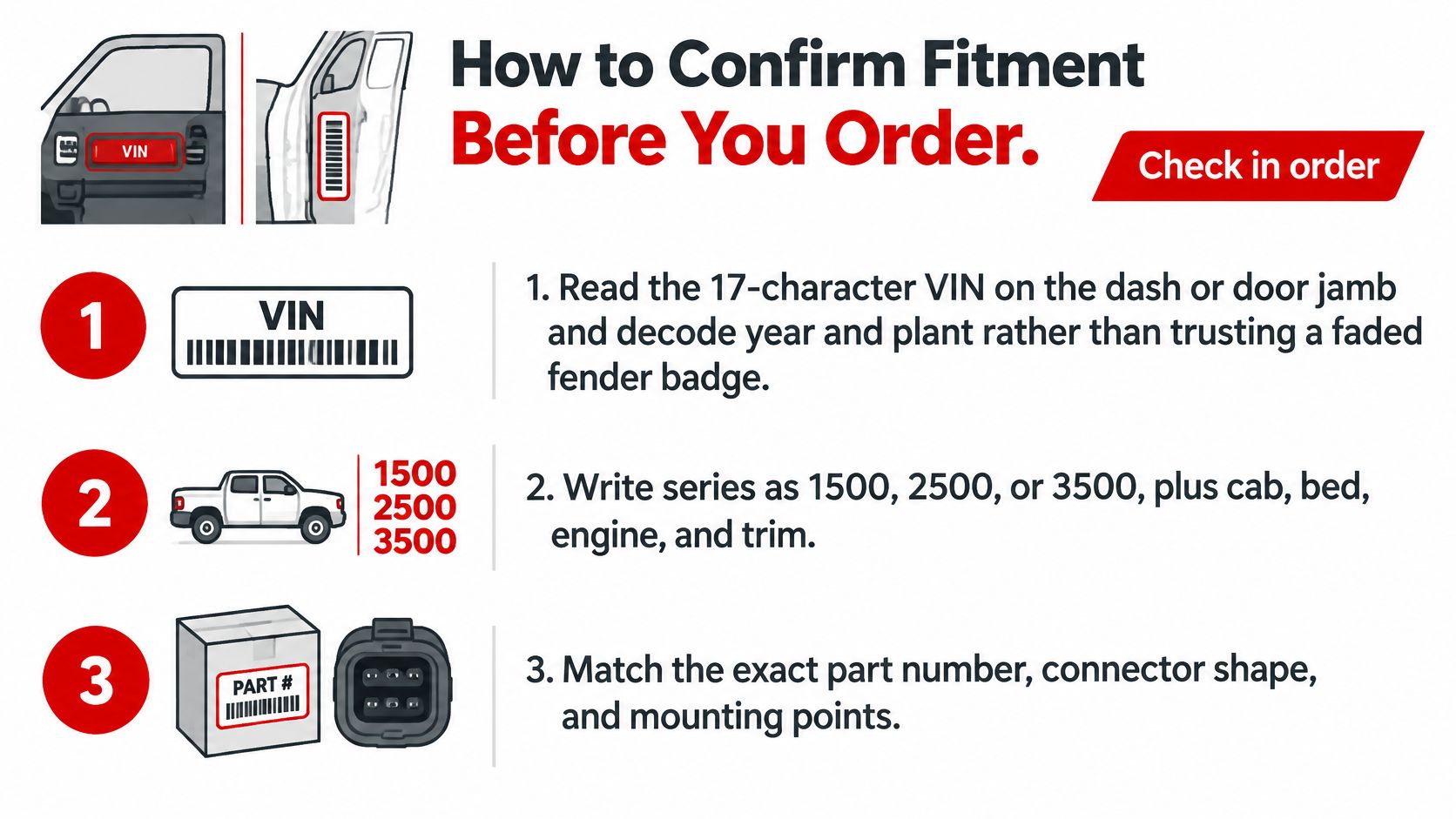
Why the same model year can still mislead
A 2025 NHTSA recall report on 2022 Sierra 1500 chrome grille deflectors identifies 70,768 trucks produced from November 9, 2021, through September 29, 2022. The report gives an estimated defect rate of 3% and records 1,225 potentially related field complaints, including four accident allegations. The affected grille-deflector and hood-molding parts included numbers such as 86813651, 86813649, 85573240, 85573242, 85573244, 85573250, 85573251, 85557820, 85557821, and 85557819.
The recall excluded trucks built before the mid-cycle enhancement and trucks without chrome grille deflectors. That's the kind of boundary a model-year filter alone can miss: production timing, finish, and original component design can all matter. Two keys may look identical and still open different doors. A part can look identical and still fail to fit or function correctly.
If you're unsure how to use the truck's VIN to narrow the catalog, T1A Auto's guide to searching for parts by VIN explains the vehicle-based approach. Search by vehicle, then reject a listing that can't state the cab, side, and OEM cross-reference relevant to the part.
Here's a useful video to keep beside the written checklist:
OEM Aftermarket and CAPA Parts Compared
| Source | Best when | Proof of fit | Usual drawback |
|---|---|---|---|
| Dealer OEM | Recall remedies and modules that need GM programming | GM part number and VIN | Highest price and longer waits |
| Quality aftermarket | Wear items and metal upgrades over cracked plastic | Year, cab, side, and OEM cross number | Must reject vague listings |
| CAPA-certified | Insurance and collision lamps, covers, sensors, or cameras | CAPA seal and certified part number | Not available for every wear part |
| Used or salvage | Rare discontinued trim | Photos of connector, finish, and stamp | Corrosion or the wrong option code |
Dealer OEM is the straightforward route when the repair is a recall remedy or when a module needs GM programming. Ask for the GM part number and have the counter verify it against the VIN. You may pay more or wait longer, but the part is traceable to the manufacturer's application.
A quality aftermarket part makes sense for common wear hardware when the listing gives the exact year range, cab, side, and OEM cross-reference. If you're replacing a plastic component that has cracked under ordinary use, a compatible metal version may be a sensible alternative. Don't trust a listing that only says “fits Sierra” without enough detail to establish the match.
Choose by the repair, not by the label
CAPA certification matters when a collision center or insurer needs documented standards for a covered replacement component. Look for the CAPA seal and certified part number on the part type in question, such as a lamp, bumper cover, sensor, or camera. Certification isn't a decoration, and it doesn't apply to every handle, cable, or other wear item. For a closer look at what certification means, see this guide to CAPA-certified parts.
Used or salvage parts can help when a trim piece is discontinued or hard to source. Ask for clear photos of the connector, finish, and part stamp, then check the truck's options. A connector can look right while the used part carries the wrong feature package, and corrosion may be hidden until the piece is in hand.
The newest or highest-priced option isn't automatically the correct one. The right choice matches the finish and package, and it accounts for whether the truck needs a relearn after installation.
- Fleet verdict: For a fleet replacing extended-cab handles, choose a source that documents fitment and warranty clearly. Keep the vehicle and part numbers on the repair record so repeated orders follow the same match.
- Body-shop verdict: Use CAPA documentation when the specific collision part carries the certification and the insurer needs it. Don't assume a certification applies to an adjacent part.
- DIY verdict: For a tailgate cable, buy the correct left-and-right pairing and verify generation and bed before disassembly. A matched hardware job is simpler than discovering the opposite-side cable doesn't fit halfway through.
When a New Part Still Needs Programming
Fitment can be perfect and the truck can still misbehave. A replacement may bolt into place and connect to the harness yet still need a relearn, calibration, or software update before the truck operates as intended.
| Integration level | Sierra examples | Who can finish it |
|---|---|---|
| Plug-and-play | Door handles, tailgate cables, many manual mirrors | DIY owner with hand tools |
| Requires relearn | TPMS after sensors or wheels, some regulator motors | Shop scan tool or published procedure |
| Requires calibration | Backup camera image, parking sensors, trailer-brake controller | Shop with the correct procedure |
| Dealer-level programming | ECM fuel-system calibration and some control modules | Dealer or GM-level programming access |
Treat those categories as a starting point, not a promise that every truck follows the same procedure. A simple handle or cable is usually a physical repair. A wheel or sensor change may require a TPMS relearn, while a camera or related system may need calibration. Check the service information for the particular truck before assuming the job ends when the last fastener is tight.
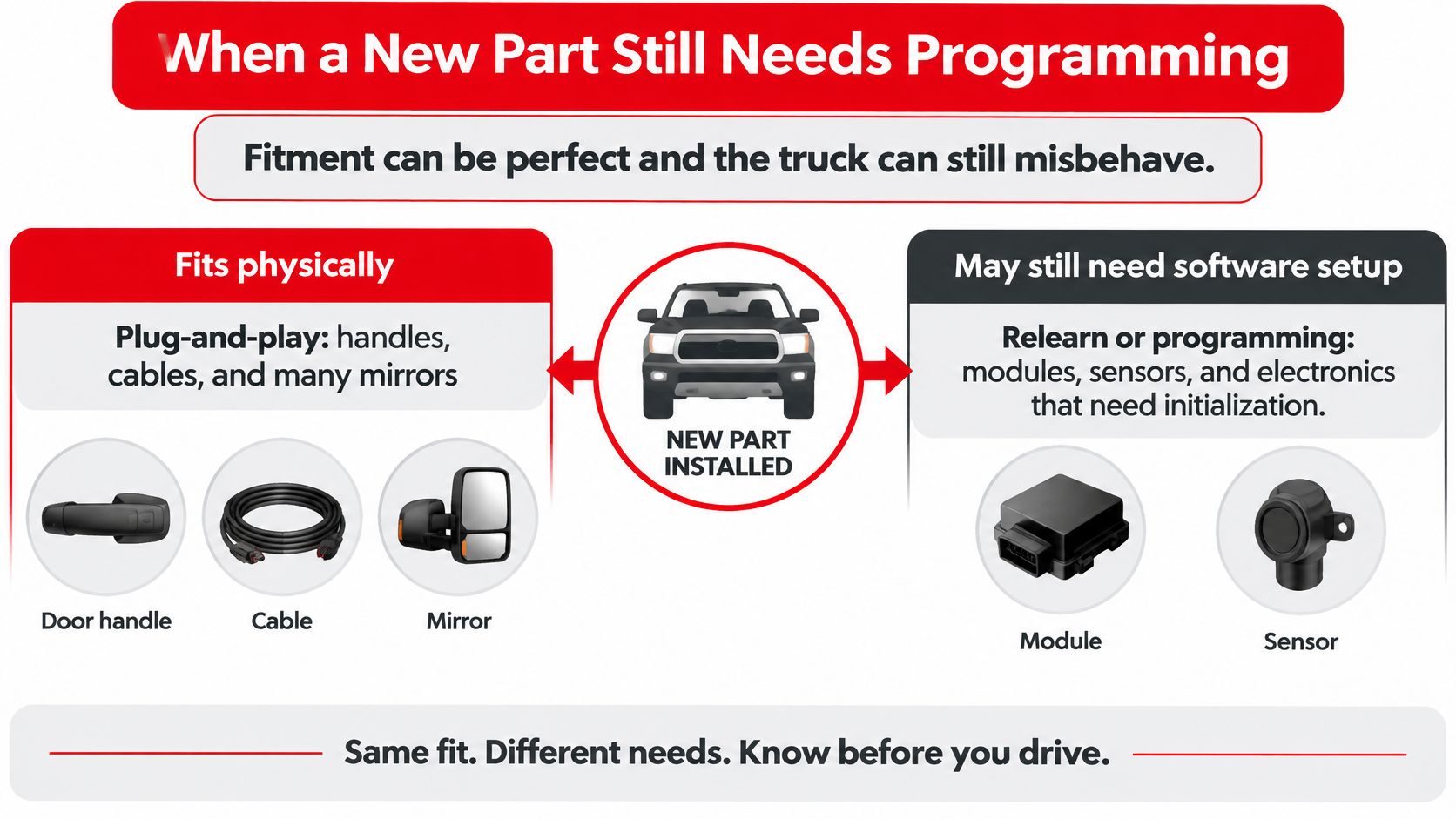
Software can be part of the repair
A 2025–2026 Sierra 3500 NHTSA recall report involving dual fuel tanks describes a remedy that requires an ECM calibration update. Incorrect software can interrupt fuel transfer and potentially cause an engine stall; the update may be delivered over the air or by a dealer. Replacing a related pump, sensor, or wire doesn't install the required calibration.
That's the practical gap between physical fitment and a finished repair. Before ordering an electronic part, an independent shop should pull the VIN, confirm the engine and RPO codes, and retrieve diagnostic trouble codes. Those checks help separate a failed component from a software, wiring, or setup issue.
A DIY owner can often finish straightforward hardware work with hand tools, but should stop when the job calls for programming or a scan-tool procedure they can't verify. Driver-assistance, towing, and connected-vehicle features make that distinction increasingly relevant: a sensor or module may be only one piece of the repair.
A part that mates to the connector hasn't finished the repair until the truck agrees with it.
How to Replace the Parts Owners Change Most
These are driveway jobs after fitment is confirmed. Gather trim tools, the correct sockets, tape, and a container for fasteners before you start. Work slowly around clips and wiring, and stop if you find damaged harnesses, airbag components, or a repair that calls for module programming.
Door handles
On a powered-lock door, disconnect the battery before removing the panel. Find the screw in the door pull or behind a trim cap, then release the panel clips with a trim tool rather than pulling hard on one corner. Support the panel as you disconnect wiring, and move the linkage clips without bending the rods.
Swap the handle, reconnect the rods, and test the lock and latch with the door open before reinstalling the panel. A matching part number and side matter; a handle that looks close but has a different rod connection can leave the door stuck or difficult to open.
For example, the metal rear driver-side extended-cab handle crossing to OEM 15758172 is listed for specified Chevrolet Silverado and GMC Sierra extended-cab applications. It's a left-side replacement, so verify the year, series, cab, and side before treating it as a match.
Tailgate handle and cables
Drop the tailgate and remove its access panel. If the handle assembly includes a switch, unplug it before releasing the rods, and transfer the gasket if the replacement design calls for it. For cables, support the gate, replace both sides as a pair, and cycle the gate slowly to check that it stays level and moves smoothly.
Power-unlatching HD tailgates call for more caution. The NHTSA report for recall 24V060 describes water reaching the exterior touchpad switch on affected 2020–2024 Sierra HD 2500/3500 trucks, potentially causing a short and unexpected unlatching while the vehicle is in Park. Replacing only the mechanical latch may miss the specified remedy, which involves the exterior touchpad switch assembly.
Until the repair is complete, verify the tailgate is fully closed and latched before driving. During diagnosis, inspect for moisture pathways, switch contamination, and connector corrosion, then confirm the interior switch and key fob operate correctly. For handle and assembly details, use a truck-specific Sierra tailgate handle guide as a reference, not as a substitute for the exact repair procedure.
Window regulators, mirrors, and cameras
For a window regulator, tape the glass securely in the raised position before unbolting it. Remove the panel, release the glass from the regulator, and take out the regulator and motor as required by the replacement design. Test full glass travel before putting the panel back, listening for binding or cable noise.
When replacing a mirror, decide whether the glass alone is damaged or the power head needs replacement. Compare the connector and preserve the pins for heat, signal, or camera features. If the mirror includes electrical functions, test them before refitting trim.
For a backup camera, install the correctly matched unit in the tailgate housing, reconnect the harness, and check the image in Reverse. If the view is misaligned or a related system requires calibration, don't assume the new camera alone has completed the repair. A clear image and an intact connector are part of the final check.
Order the Match and Verify the Truck
Record the VIN, series, cab, engine, and relevant option codes before choosing a listing. Then compare the part number and physical details. A part can bolt on and still leave the truck wrong if its connector, options, or required setup do not match. For shop work, put the VIN and replacement part number on the repair order so the next person can identify the exact configuration.
T1A Auto lists free standard shipping on orders over $75, free returns for 90 days, a lifetime warranty on metal components, and a 3-year warranty on standard items. Its support aims to resolve issues within 24 hours. Check the terms for the specific part: a standard plastic handle is covered under standard-item terms, while a metal handle or upgrade falls under metal-component coverage.
For fleets, order left-and-right pieces together when the repair calls for a matched pair, and keep each truck's identifiers with its parts record. For collision invoices, attach CAPA documentation only if the specific lamp, cover, sensor, or camera carries that certification.
Check configuration-specific safety details, too. For certain 2024–2025 Sierra 2500 trucks with an enhanced towing option and 20-inch accessory wheels, the NHTSA report on the towing and tire-pressure issue specifies 80 psi for the rear tires, rather than the 70 psi shown in supplied accessory information. The recall calls for correcting the tire label, adjusting inflation, and performing a TPMS relearn. After configuration-specific repairs, verify tire pressure, TPMS status, camera image, sensor warnings, and towing-system operation.
Whether you're repairing one Sierra at home or sourcing parts for a shop, match the part to the truck and confirm any required setup before closing the job. Visit T1A Auto to search vehicle-specific replacement parts, compare fitment details, and find hardware for common Sierra repairs.
