


“Year, make, and model” sounds like enough information to order a Chevy truck part. Often, it isn't. A mirror, handle, or camera can change with the truck's generation, cab, side, wiring, or factory options, and an open safety recall can make buying a replacement the wrong next step.
Use the truck's configuration to narrow the match, then verify the part number and any safety campaign before paying or starting a repair. That approach helps avoid a part that looks right but won't fit, connect, or work as intended.
Table of Contents
- Chevy Truck Generations and the Model Years That Matter
- Parts by System at a Glance
- Fitment Identifiers to Record Before You Order
- Confirm Recall Status and Fitment Before You Buy
- Door, Tailgate and Latch Parts Explained
- Mirrors, Window Regulators and Their Motors
- Cameras, Sensors and Electrical Modules
- CAPA Certification, FMVSS and Quality Standards Compared
Chevy Truck Generations and the Model Years That Matter
A truck's name can stay familiar while its parts change. Chevrolet's full-size pickups span different body designs and naming systems, so “Chevy truck parts” may bring up components for vehicles that share a badge but not a usable fit.
| Generation | Model years | Name on the truck | Parts-matching notes |
|---|---|---|---|
| Early C/K series | 1960–1966 | C/K with 10, 20, and 30 series ratings | Confirm the series, cab, bed, and drivetrain before ordering. |
| C/K | 1967–1972 | C/K | A large early installed base; confirm cab and bed before ordering. |
| Square body C/K | 1973–1987 | C/K | Interior and door hardware differ from later trucks. |
| OBS | 1988–1998 | C/K | Match body-specific door and mirror parts; don't assume interchange with later trucks. |
| GMT800 | 1999–2006 | Silverado 1500, 2500HD, 3500HD | Silverado becomes the full-lineup name; mid-cycle changes can split part numbers. |
| GMT900 | 2007–2013 | Silverado 1500, 2500HD, 3500HD | Check production date because mid-cycle changes can split part numbers. |
| K2XX | 2014–2018 | Silverado 1500 and HD | Camera and sensor packages can differ by trim. |
| T1XX | 2019–2026 | Silverado 1500, 2500HD, 3500HD | Cameras, sensors, and mirrors may require calibration after installation. |
The C/K series debuted for the 1960 model year. “C” identified two-wheel-drive trucks and “K” four-wheel-drive trucks; the 10, 20, and 30 series indicated capacity ratings. Chevrolet built more than two million half-ton trucks in the 1967–1972 generation, not counting additional three-quarter-ton and one-ton production, according to Chevrolet's account of the Silverado's history. That long-running lineage is why parts listings may use either C/K or Silverado.
Why “Silverado” can point to different trucks
Silverado first identified the top C/K trim for the 1975 model year, then became the model name for Chevrolet's full-size pickup lineup in 1999. Older listings may therefore use “Silverado” to describe a trim, while newer ones use it to identify the model.
The name alone can't settle fitment. A handle, mirror, or camera may vary with generation, cab, side, or option package, even when a listing uses the right model name. Use the generation table to narrow the search, then match the specific configuration.
Changes within a generation matter, too. A mid-cycle update can split part numbers while the truck keeps the same generation name. Record the model year and production configuration, and check the build or production date when a catalog requests it.
Before you order: Write down the model year, C/K or Silverado designation, cab style, bed length, drivetrain, and production configuration. For safety-related parts or an open safety campaign, check the campaign status before purchasing a replacement.
Parts by System at a Glance
Fitment is a configuration problem, not just a parts search. The table helps narrow the system and the details that affect fit, while the listed failures are diagnostic clues, not proof that a specific part has failed.
| System | Common parts | Typical wear or failure | Identifiers that decide fitment |
|---|---|---|---|
| Door and tailgate handles | Exterior and interior handles, tailgate handle assembly | Cracked plastic tabs; sticking or broken handle | Side, power lock or not, cab style |
| Mirrors | Power-adjust, manual-folding, and heated mirrors; mirror glass | Failed motor, cracked housing, inoperative heater | Side, power or manual, heated or not, year range |
| Window regulators | Power and manual regulators, window motors | Cable or track failure, dropped glass, failed motor | Door side, power or manual window, glass type |
| Cameras and sensors | Rearview camera, parking and bumper sensors | Corroded connector, fogged lens, false alert | Trim package, bumper type, camera option |
| Tailgate hardware | Cables, hinges, latches, fasteners | Frayed cable, worn hinge, sticking latch | Bed length and tailgate type |
| Steering and drivetrain-linked parts | Power-steering pump and related hardware | Leak, noise, reduced assist | VIN, engine, or steering option code |
Demand spans many part types. Chevrolet's Silverado history and sales overview reports 555,148 Silverados sold in 2023 and 560,265 in 2024 in the United States. A large vehicle population supports recurring demand for replacement parts, but it does not make components interchangeable across generations or configurations.
Even a mirror listing needs more than the truck's model name. Side, adjustment type, heating, and housing details can all affect fit. Use the table as a first filter, then compare the listing's specifications with the truck's configuration.
For each system, record the symptom and check how the part connects or mounts before ordering. A salvage component and a new replacement may differ in condition as well as fitment, so compare used car parts with new rather than choosing by price alone. For steering-related parts, verify the VIN and relevant option information before buying.
Fitment Identifiers to Record Before You Order
Year, make, and model alone aren't enough for every Chevy truck part. GM's service bulletin for 2024–2025 Silverado 2500HD and 3500HD models directs technicians to use the VIN and GM's electronic parts catalog to identify the correct power-steering pump, rather than relying only on vehicle-level details. The GM bulletin filed with NHTSA is a practical reminder that catalog-level verification can matter even when the truck's basic description seems precise.
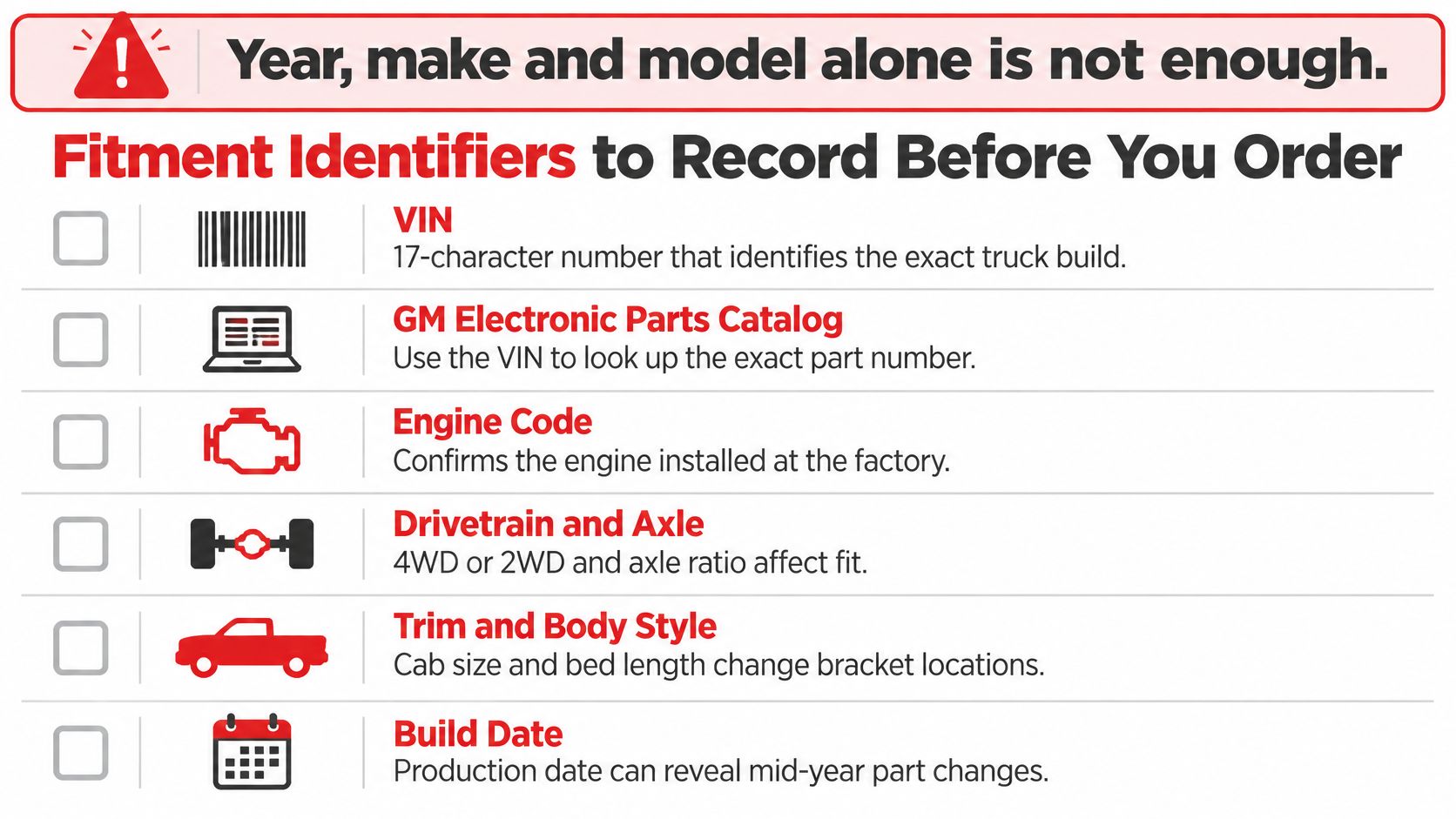
Use this identifier table to gather the details before searching:
| Identifier | Where to find it | Parts it changes |
|---|---|---|
| VIN | Driver-side dashboard or door-jamb sticker | All systems; recall lookup and electronic catalog search |
| Model year and series | Door-jamb label, title, VIN | Body, door, and tailgate parts |
| Cab style | Door count, VIN, door-panel layout | Doors, regulators, and mirrors |
| Bed length | Measure the truck bed; confirm with VIN-based catalog | Tailgate, cables, and bed-mounted parts |
| Drivetrain | VIN, door label, or emblem | Front-end, steering-linked, and suspension-adjacent parts |
| Engine option code | Door-jamb label or VIN-based catalog | Engine-related campaigns and drivetrain components |
| Side | Identify driver or passenger side while facing forward | Mirrors, handles, regulators, and latches |
| Power or manual option | Door switch and existing part | Mirrors, regulators, and window motors |
| Camera or sensor package | Trim sticker, infotainment screen, or existing equipment | Cameras, sensors, and possible calibration needs |
The VIN is typically visible through the driver-side windshield and may also appear on the door-jamb label. Use the truck's labels and existing components to cross-check options, rather than assuming an emblem or trim name tells the whole story. If you need help with the VIN-search process, this guide to searching for parts by VIN number explains how to use that identifier to narrow a catalog lookup.
Make the repair easier to verify
A low purchase price can become an expensive choice if the part causes return freight, repeat labor, a failed calibration, or an unsafe repair. Before removing anything, photograph the original component, its mounting points, connector, and wire routing. Keep the old part until the replacement is installed and confirmed to work.
Check calibration requirements before starting a camera or sensor repair. For jobs involving door panels, plan for panel removal and retain the fasteners in order so the installation doesn't turn into a search for missing clips. Keep the part number, order record, and receipt together in case you need a warranty claim or a second fitment check.
Confirm Recall Status and Fitment Before You Buy
An open safety recall overrides a parts search. A retail replacement can't stand in for a safety campaign remedy, and a truck showing signs of a safety-related defect may need diagnosis before you order anything.
NHTSA records describe certain 2019–2024 Chevrolet Silverado Medium Duty 4500HD, 5500HD, and 6500HD trucks with a brake-pressure sensor issue that could allow brake fluid to reach electrical components and short the brake-pressure switch. GM's remedy was a redesigned wire harness. The records also describe a recall involving selected 2021–2024 Silverado 1500 trucks with the L87 6.2L V8, where engine-component damage could cause loss of propulsion; replacement parts were initially unavailable. NHTSA's report on the medium-duty brake-pressure sensor issue shows why a symptom doesn't always call for a routine parts purchase.
Triage the symptom first
- Routine wear symptoms: A broken handle, dead camera, loose tailgate, or stuck window may be a standard repair. Confirm fitment, then proceed if no safety concern is involved.
- Potentially serious symptoms: Warning lights combined with fluid leakage, an electrical odor, or loss of propulsion are reasons to stop and check for an open campaign before buying parts. Don't rely on a replacement sensor or harness to resolve an issue that may have a recall remedy.
- Fleet vehicles: Record the truck's downtime and the VIN, then escalate an open campaign to a Chevrolet dealer. Recall repairs are completed by dealerships at no charge, so confirm eligibility and the remedy before authorizing a separate repair.
Run the VIN through NHTSA's recall lookup and call a Chevrolet dealer if the result is unclear. Keep a note of the lookup and the dealer's response, including whether a remedy is available. Order routine replacement parts only after the campaign check.
Once that safety check is complete, a vehicle-based catalog search can help narrow ordinary replacement parts. But the VIN lookup is the gate: don't let a familiar symptom or an appealing listing take its place.
Door, Tailgate and Latch Parts Explained
A handle or tailgate component can look simple and still have several fitment variables. Match its position, mounting points, lock or switch features, and wiring before choosing a replacement.
Handles and bezels
An exterior door handle is specific to its side and door. Check whether the original has a keyhole and power-lock features; similar-looking handles can use different configurations. Plastic mounting tabs are a common break point, so inspect the handle and mounting area before concluding the lock or latch has failed.
Interior handles and bezels have separate failure points. A broken clip or worn pivot may call for a bezel or handle repair rather than a complete door mechanism. For example, if the interior handle moves loosely but the latch still releases when operated directly, check the handle pivot and linkage before replacing the latch assembly.
If a door repair also involves a lock cylinder or key issue, car lock advice from Top Motor Keys can help distinguish the lock problem from a broken handle. Keep the two diagnoses separate: a handle that won't move and a key that won't turn aren't necessarily the same fault.
Tailgate assemblies and supporting hardware
A tailgate handle assembly may include a camera or handle switch. Compare the connector and mounting location with the original before ordering. If the camera mounts in the handle, a visually similar handle without the right opening or plug won't do the same job. A Chevy tailgate-handle fitment guide can help with the model-specific details.
A stretched or frayed tailgate cable can let one side drop unevenly. Inspect both cables; replace them in pairs when both show wear. Check hinges and latches for rust, worn bushings, or a striker that no longer lines up. A sticking latch may come from alignment or wear, so replacing the handle alone might not solve it.
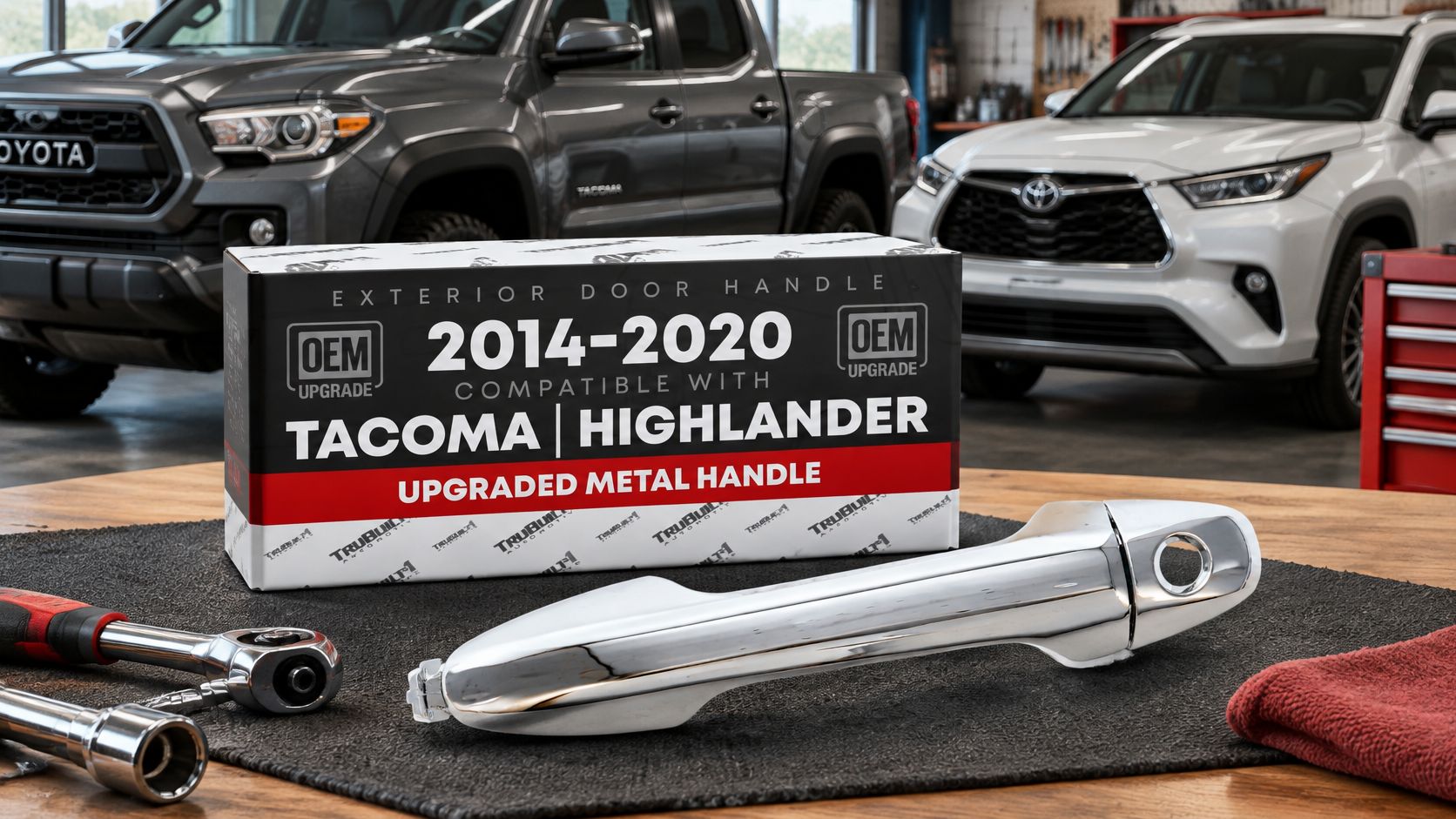
For comparison, the Exterior Front Driver Door Handle & Cover, Upgraded Metal, compatible with 2016–2020 Toyota Tacoma and 2014–2019 Toyota Highlander is described as a chrome, front-left handle with a keyhole and specified OEM part-number matches. It's a Toyota-fitment example, not a Chevy part; the useful lesson is to verify side, keyhole, finish, and application rather than assuming a metal handle will fit another vehicle.
Fasteners need the same attention as the main part. Match the original thread size and grade, particularly at hinges, and don't substitute a bolt just because it threads in. A metal upgrade can be worth considering where the original plastic handle has repeatedly failed, but material alone doesn't establish fit. Confirm side and cab style first, then check the part number against the truck.
Mirrors, Window Regulators and Their Motors
Mirrors and window regulators are often shopped together because they sit in the same door, but they fail differently. Diagnose each system on its own before replacing parts.
Match the mirror's options
Compare the original mirror's complete option set: power adjustment or manual, folding style, heated glass or not, and housing finish. A paintable smooth housing can accept the vehicle's color; a textured housing is a different surface. Then verify side, mounting points, connector, and year range.
For example, a driver-side mirror listed for 1988–2000 Chevy or GMC C/K may be described as power-adjust, manual-folding, non-heated, and fitted with a paintable smooth housing. Match those attributes to the truck's original equipment rather than searching only by “C/K mirror.” A dead adjustment motor doesn't tell you whether the replacement needs heated glass or a particular housing.
Test the regulator before buying
A window that drops, grinds, or moves in one direction may have a damaged regulator cable or track. If the switch clicks but the glass doesn't move, the motor or wiring could be at fault. Test in order:
- Check power at the switch. Confirm the circuit has power before ordering a regulator.
- Listen while operating the switch. Open the door and listen for the motor. A running motor with no glass movement points toward the regulator or its connection to the glass.
- Inspect the fuse and connector. If the motor stays silent, check the fuse, connector, and wiring before buying a motor.
- Support the glass. Secure the window before removing the regulator so it can't drop into the door.
If the switch or connector has burnt pins, a regulator may appear dead even when it isn't the failed component. Verify the circuit and connector before committing to a replacement. When you remove the door panel, keep track of clips and fasteners, and make sure the glass is supported throughout the repair.
Cameras, Sensors and Electrical Modules
A camera fault is a configuration problem as much as an electrical one. The same-looking unit can differ by mounting location, connector, tailgate design, or trim package. A black image, fogged lens, screen lines, or intermittent rearview view may point to the lens, wiring, connector, or ground, not necessarily a failed camera. Inspect those first.
Check where the original camera sits: it may be built into the tailgate handle, bumper, or upper tailgate panel. Match its housing, connector, and part number to the truck's original equipment, then confirm the display works after installation. If a safety recall applies to the truck or camera system, resolve that campaign before buying a replacement.
Separate sensor problems from calibration needs
Parking sensors are position-specific. Record whether the unit is on the front or rear bumper and where it sits in the row. A false alert may come from a wet bracket or cracked sensor boot, so inspect the surrounding hardware before ordering.
Some camera or sensor repairs require a scan tool to run calibration or relearn procedures. Before removing parts, check the service instructions for the truck's generation and equipment, and confirm whether calibration is required after replacement or a change in mounting position. If the repair does require it, use a scan tool with the camera or parking-assist calibration function, then follow the on-screen procedure. A camera aimed from a changed position can show the wrong view, while an uncalibrated parking sensor can trigger alerts at the wrong distance.
For an intermittent camera, inspect the plug and wiring before replacing an electronic module. Compare the replacement connector and part number with the original. That sequence helps separate a connection fault from a mismatched or failed component.
CAPA Certification, FMVSS and Quality Standards Compared
A part's label is only one piece of the fitment decision. CAPA certification identifies an aftermarket collision part evaluated against benchmarks for fit, form, and function. For a Chevrolet truck, match the part to the generation and configuration as well: the same type of handle, mirror, or camera can vary by cab, side, and option package.
| Criterion | OEM dealer part | CAPA-certified aftermarket | Uncertified aftermarket |
|---|---|---|---|
| Verification | Factory-released part | Tested against OEM benchmarks for fit, form, and function | No independent certification |
| Materials and build | Factory specification | Product-specific; some metal parts replace plastic | Varies by product |
| Warranty | Dealer warranty terms | Check the product listing for applicable terms | Check the product listing for applicable terms |
| Documentation | Dealer catalog and VIN lookup | Certificate or part-number cross-reference | Documentation may be incomplete |
| Best use | Recall repairs, warranty work, and safety-regulated parts | Collision repairs and routine parts where certification is relevant | Non-critical items with careful fitment checks |
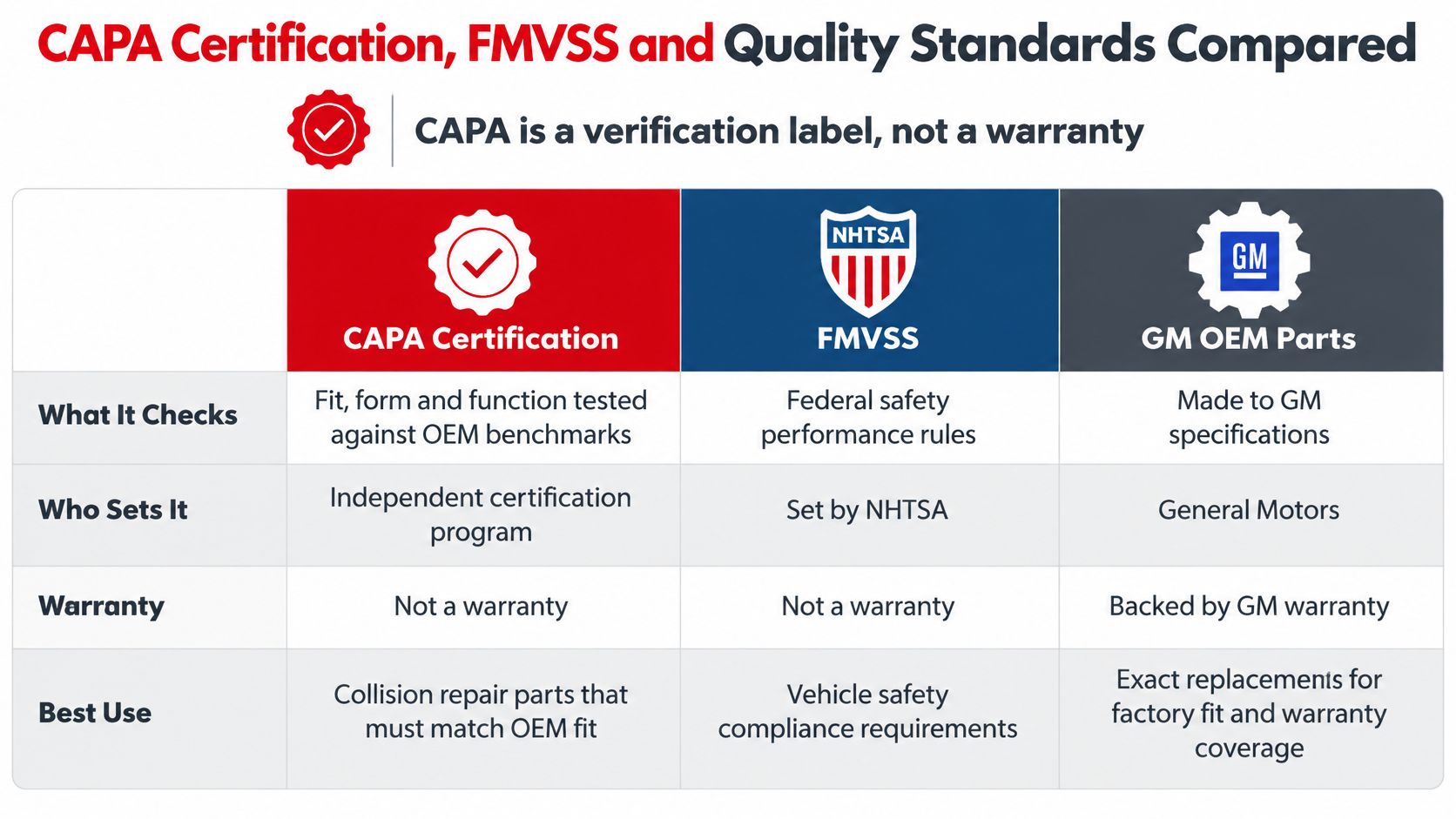
Check whether the part falls under FMVSS
Federal Motor Vehicle Safety Standards cover specific equipment categories. NHTSA identifies brake hoses (FMVSS No. 106), lamps and reflective devices (No. 108), tires (No. 109), brake fluid (No. 116), glazing (No. 205), and seat-belt assemblies (No. 209). NHTSA's interpretation of FMVSS requirements explains how to determine whether a replacement part falls within a regulated category.
A mirror, handle, latch, tailgate cable, window regulator, camera, or exterior panel still needs to fit and function correctly. These parts do not automatically fall under the same certification requirements as regulated brake, lighting, glazing, or restraint components. If a replacement is in an applicable FMVSS category, it must be certified as meeting that standard. Repairs must also preserve required safety systems.
Before ordering, ask the supplier for the CAPA certificate or a part-number cross-reference, then confirm the application using the truck's VIN and configuration. If documentation is unavailable, consider how the part will be used and what a mismatch could affect. This guide to CAPA-certified parts explains what the certification indicates.
T1A Auto offers handles, mirrors, regulators, tailgate hardware, cameras, and sensors, with vehicle-based catalog searches to help narrow compatibility. Record the VIN and configuration, and check for open safety campaigns before purchasing. Then use T1A Auto to search for a matching replacement.
