


You're halfway out of the driveway, turned over your shoulder, and still can't see the child's bike, the low curb, or the hitch sitting directly behind the bumper. The same problem shows up in a shop bay, on a pickup with tall bed sides, and in an SUV where the rear pillars hide everything below the beltline. A mirror-mounted backup camera won't eliminate the need to look around the vehicle, but a correctly installed system gives you a clear view when the factory glass isn't enough.
The hardware is manageable for a careful DIY installer. The part that separates a reliable job from a Saturday afternoon spent chasing faults is the finish work: a solid ground, the correct reverse signal, protected cable routing, compatible mirror wiring, and an image aligned for useful depth judgment. This guide focuses on how to install a rear view mirror backup camera so it comes on when it should and still works after the trim is back in place.
Table of Contents
- Why a Mirror-Mounted Backup Camera Is Worth the Afternoon
- Tools, Parts, and Prep Before You Touch a Wire
- Mounting the Mirror and Camera the Right Way
- Wiring Power, Video, and the Reverse Trigger
- Working With Auto-Dimming Mirrors and Modern Harnesses
- Testing the System and Fixing Common Problems
- Final Checks, Maintenance, and Warranty Notes
Why a Mirror-Mounted Backup Camera Is Worth the Afternoon
You clip the mirror in place, power it up, and the image washes out in afternoon sun before the truck leaves the driveway. Another common failure appears later: the screen powers on, but the reverse trigger arrives late or not at all. A mirror-mounted camera keeps the display in your normal sightline, yet the installation only earns its place if the picture is usable and the system responds every time you select Reverse.
That packaging works especially well in pickups and SUVs. A tailgate, spare tire, cargo load, or tall rear pillar can hide the area closest to the bumper. The U.S. rear visibility rule finalized by NHTSA in 2014 took full effect on May 1, 2018 for new vehicles under 10,000 pounds GVWR sold in the United States, including cars, SUVs, vans, buses, and trucks. The rule followed the 2008 Cameron Gulbransen Kids Transportation Safety Act and helped make rear cameras ordinary safety equipment rather than optional luxury technology. ABC News' report on the federal backup-camera requirement provides the historical context.
What the camera should actually show
Aim for the space immediately behind the vehicle, with enough pavement visible to judge the bumper, hitch, and rear tires against nearby obstacles. A dramatic horizon view looks impressive but gives poor depth information. U.S. compliance discussions used a target zone measuring 10 feet by 20 feet behind the vehicle, as described in this U.S. Department of Transportation rear-visibility safety record. Use that zone as an alignment reference, then confirm the view from the driver's seat.
NHTSA estimated that universal rearview-camera equipment could reduce annual backover fatalities by 95 to 112 deaths and injuries by 7,072 to 8,374. Those figures explain why camera position, a clean ground, and dependable transmission switching matter more than a tidy-looking mount.
Practical rule: A mirror camera is a visibility tool, not a substitute for mirrors, shoulder checks, or walking around the vehicle before backing.
The trade-offs show up after installation. Direct sun can wash out the mirror display. A weak ground can create interference or an intermittent picture, while a camera with power but no clean reverse trigger can leave the screen blank when you need it. Check mirror compatibility before cutting into the harness, and align the camera after the vehicle is sitting on level ground. Those steps prevent the failures that turn a quick upgrade into a trim-removal job.
Tools, Parts, and Prep Before You Touch a Wire
Lay every component on a clean bench before opening the doors. A typical kit should include the mirror monitor, its power and video pigtails, the rear camera and attached lead, a video extension cable, a reverse-trigger lead, mounting hardware, and enough cable protection for the route you've planned.
You'll also want electrical connection supplies matched to the vehicle. Keep fuse taps for the applicable mini, micro, or standard blade-fuse style, ring terminals, heat-shrink tubing or quality crimp connectors, electrical tape, self-tapping screws, and zip ties nearby. A fuse tap that doesn't match the fuse box can create a poor connection or damage the circuit, so identify the vehicle's fuse type before buying supplies.
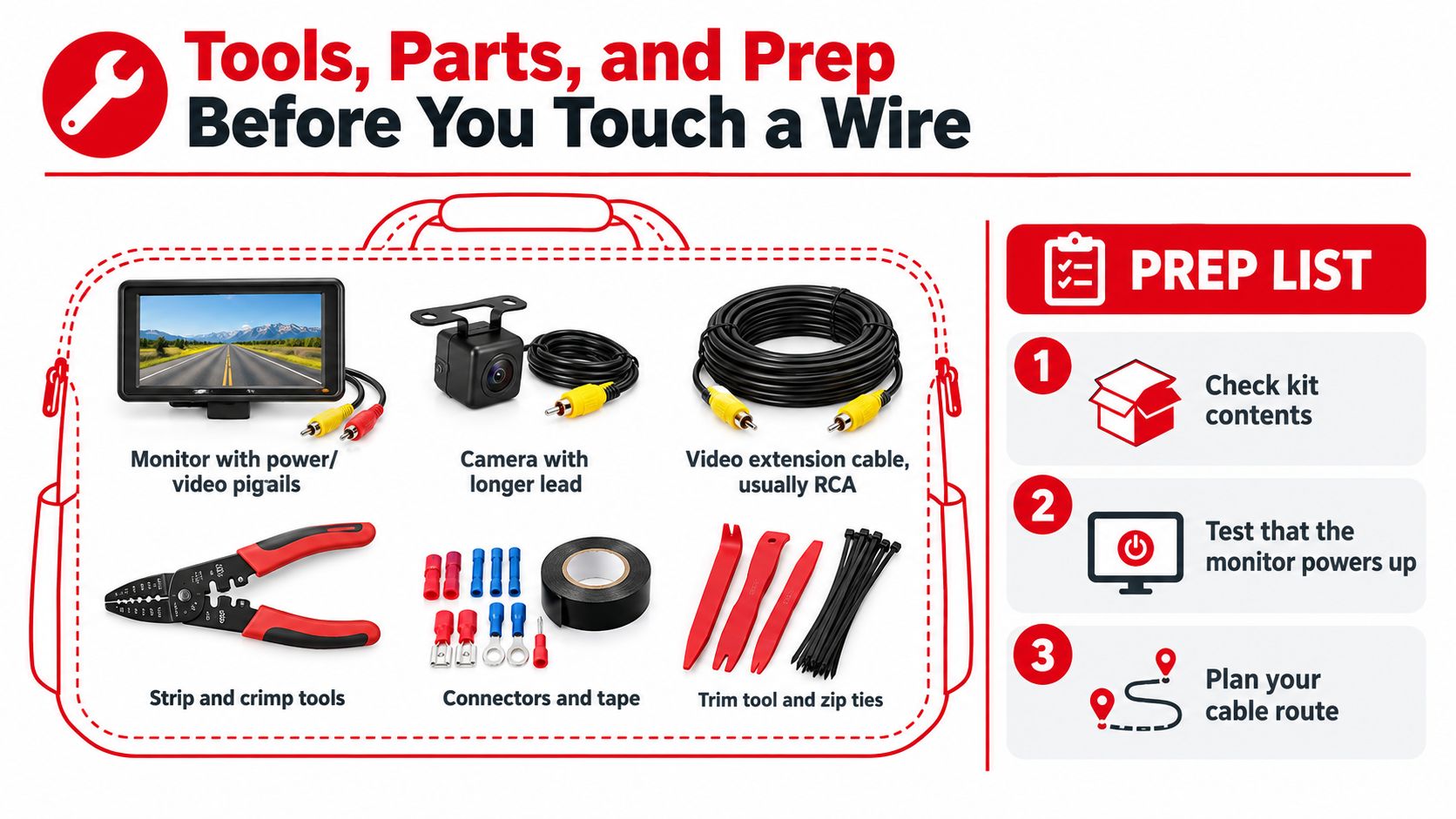
The tools that prevent avoidable mistakes
- Trim-removal tools: Use tools shaped for automotive clips instead of a flat screwdriver. Cheap or unsuitable tools can mark plastic and snap retainers.
- Digital multimeter: You'll use it to confirm the reverse-light feed and identify a power source. Guessing from wire color is how installers tap the wrong circuit.
- Quality crimpers or a soldering iron: The connection must survive vibration, moisture, and temperature changes. Crimp firmly, then seal the joint where appropriate.
- 10mm wrench: Many vehicles use a 10mm battery terminal fastener. Disconnect the negative terminal before working around powered wiring, but check the vehicle manual for any reset or security requirements.
- Painter's tape: It gives you a temporary camera mount while you evaluate the image and lets you mark drill locations without scratching paint.
- Magnetic light or phone mount: Interior cable routing gets awkward under the dash and behind kick panels. Hands-free lighting makes it easier to keep connectors visible.
Test the monitor on the bench if the manufacturer's instructions allow it. Confirm that the screen powers up, identify the video input, and locate any camera settings, loop wire, or polarity switch before the camera is buried behind trim.
Set the vehicle on level ground, engage the parking brake, and keep the work area clear. Don't balance the monitor on the passenger seat while you pull trim across it. A clean bench reduces lost hardware and makes it easier to compare each connector with the installation manual.
Mounting the Mirror and Camera the Right Way
Treat the mirror and camera as one alignment job. A level mirror with a badly aimed camera still gives you a useless view, while a centered camera cannot compensate for a display that vibrates or sits at an awkward angle. The image must remain readable from the driver's seat, and the camera must show usable ground behind the vehicle every time you select Reverse.
Start at the windshield. A clip-on monitor should grip the factory mirror without blocking its adjustment range. A replacement mirror needs the correct vehicle-specific mount. A mismatched bracket can strain the windshield button or let the housing twist over rough roads. Sit in the driver's seat, adjust the mirror, and confirm that you can read the screen without looking far below the normal mirror position.
Protect the front cable route
Run the mirror harness into the headliner and follow the factory wiring path along the A-pillar. Keep the cable beside the factory loom, never across the path of a side-curtain airbag. Do not force trim over a thick connector. Leave enough slack at the mirror mount for adjustment, then secure the harness where it cannot rattle.
Remove the A-pillar trim according to the vehicle's service procedure. Some clips release with a straight pull, while others require a specific direction or tether release. If the panel resists, stop and inspect the retaining hardware. Levering harder near the glass or airbag area is how trim gets damaged and clips disappear inside the pillar.
At the rear, hold the camera temporarily with painter's tape above the license plate or in the intended bumper opening. Center it as closely as the body design allows, then check the actual monitor view from the driver's seat. The image should include the ground behind the bumper and useful reference points, without tilting toward the sky or filling the display with pavement.
Commit only after alignment
As noted earlier, use the rear visibility target as a practical reference. Place a traffic cone at each corner of that viewing zone and verify that the guide lines bracket them on screen. This exposes a camera that is aimed too high, too low, or off-center before you drill the body. Keep a small amount of bumper or tailgate visible along the lower edge when possible, since it helps with close-distance judgment.
Mark the holes with tape and drill pilot points sized for the supplied screws. Seal the cable entry with a suitable product after cleaning the surface. RTV silicone can help keep water out of a drilled opening, but follow the product instructions. Use an existing grommet whenever possible, and protect the cable from sharp sheet metal with loom or a grommet.
Do not fully cinch the rear cable yet. Leave a modest service loop near the camera and tailgate hinges, then loosely secure the run until the electrical and image tests pass. This makes it possible to correct a bad angle or connector problem without tearing the trim back out.
Wiring Power, Video, and the Reverse Trigger
A dependable installation has three separate paths. Camera power supplies the rear unit, the video cable carries the image to the mirror, and the reverse-trigger signal tells the display when to switch inputs. Treating those as one vague bundle makes troubleshooting much harder.
At the rear camera, the red lead is commonly connected to the positive side of the reverse-light circuit, while the black lead goes to chassis ground. The trigger lead, which may be a separate wire or a wire integrated into the video harness, connects to the vehicle's backup-light circuit and the mirror or head-unit trigger input. Follow the kit's wiring diagram because manufacturers don't use identical colors or connector layouts.
Verify the circuit before making the splice
Use the multimeter at the reverse-light harness. With the vehicle secured and the ignition in the required position, identify the wire that shows a 12V signal only in Reverse, as recommended in this rearview-camera installation guide. Don't trust a color chart copied from another model year. Test the wire on your actual vehicle.
The ground deserves the same attention. Scrape or clean a nearby chassis point to bare metal, use a ring terminal, and fasten it tightly. A painted, rusty, or dirty ground can let the camera appear to work during a quick test and then fail when vibration or moisture changes the connection.
Route each path for its job
Run the video cable forward along a protected factory route. Depending on the vehicle, that may mean the roof edge, door sill, kick panel, or a frame-protected path beneath the interior. Keep the cable away from exhaust heat, sharp edges, seat tracks, hinges, and moving tailgate hardware. Leave service loops at a tailgate boot or hinge so the cable isn't stretched every time the panel moves.
At the front, power the mirror monitor from the source specified by the kit, often an accessory or constant fuse depending on how the monitor is designed. Use a correctly sized add-a-fuse, and place the fuse in the tap as required by the manufacturer. Connect the reverse trigger to the verified reverse-light feed rather than an accessory circuit.
A clean install has a clean diagnostic map: power at the camera, continuity through the video path, and a trigger that changes state only in Reverse.
For vehicles where the tailgate or its supports are already worn, don't pull a camera cable across unstable hardware. The T1A Tailgate Cable Replacement Set, Rear Driver & Passenger Side, compatible with 2017-2019 Chevrolet Silverado and 2017-2019 GMC Sierra is a separate replacement option using metal support cables and OEM part numbers 84361194 and 84361193.
Use this backup camera wiring diagram as a reference alongside the kit's own instructions.
Before reinstalling trim, power the system, select the correct video input, and test the trigger repeatedly. A connection that works once isn't finished work.
Working With Auto-Dimming Mirrors and Modern Harnesses
Newer trucks and SUVs often have more than a simple mirror and two wires. Auto-dimming glass, compass modules, rain sensors, Homelink buttons, microphones, and other features can share the mirror area. Disconnecting the factory harness without identifying it first can disable an existing feature or leave a connector rattling inside the headliner.
Start by photographing the original connector and checking the mirror-camera manufacturer's compatibility list. Match the OE connector and pin function to the supplied adapter harness. A plug that physically fits isn't proof that the power, ground, data, and illumination pins are arranged correctly.
Common mirror connector types and adapter harness notes
| Vehicle Brand | Common Connector | Adapter Needed? | Notes |
|---|---|---|---|
| Chrysler | Multi-pin factory mirror connector | Often | Confirm pinout before using shared power or data wiring. |
| GM | Multi-pin connector near the mirror mount | Sometimes | Preserve auto-dimming and compass connections where fitted. |
| Honda | Vehicle-specific multi-pin connector | Often | Release the locking tab carefully and verify camera-monitor compatibility. |
| Toyota | Vehicle-specific multi-pin connector | Often | Don't assume a similar-looking plug has the same pin arrangement. |
The table is a starting point, not a wiring authorization. Connector designs vary by model and equipment package, so the vehicle service information and the camera manufacturer's harness documentation take priority.
Remove the A-pillar trim with the airbag route in mind. Never run the new wire across the airbag module or between the airbag and the trim panel. Keep it alongside the original loom, secured so it can't become a loose object or interfere with deployment.
Factory mirrors with compass or auto-dimming functions may already have usable constant power and ground, but that doesn't mean the new monitor can be piggybacked onto every pin. CAN-bus-equipped mirrors may need a decoder, resistor, or vehicle-specific interface. If the included cigarette-lighter adapter is awkward or leaves a cable across the cabin, a properly fused hardwire kit can be cleaner, but only after confirming the monitor's current and ignition requirements.
Use the manufacturer's wiring information before changing any factory connection. This guide to auto-dimming mirrors is useful background, but it isn't a substitute for the exact connector and pinout for your vehicle.
Testing the System and Fixing Common Problems
The installation isn't complete when the screen lights up on the bench. Test it from a cold start, with the vehicle in normal operating conditions, because late triggers, weak grounds, and poor connections often appear only after the cabin is reassembled.
Set the parking brake and keep the vehicle stationary during the test. Confirm the monitor boots with the ignition, select the correct input, then engage Reverse and watch the transition. The image should appear promptly, and the guide lines should match the vehicle's actual path rather than pointing toward a neighboring parking space.
Match the symptom to the likely fault
- Black screen: Start with the rear ground, camera power, monitor power, and selected input. A trigger with the wrong polarity can also prevent the display from switching.
- No signal: Reseat the RCA or multi-pin video connectors at both ends. Inspect the cable for a crushed section, especially where it passes through a tailgate boot or under a trim clip.
- Upside-down or mirrored image: Check the camera's loop wire, DIP switch, or menu setting. Many cameras use a cuttable loop or setting to change image orientation.
- Late activation: Recheck the trigger tap. A rear defrost, accessory, or other delayed circuit isn't a substitute for the reverse-light feed.
- Flickering image: Move the video cable away from high-current or noisy harnesses, then test the connectors for looseness. A damaged cable jacket can produce intermittent faults that resemble interference.
- Wireless dropouts: Re-pair the transmitter and receiver, confirm the selected channel or input, and move antennas away from dash cams and other potential 2.4GHz interference sources.
The rearview-camera troubleshooting manual is useful when a kit requires pairing, input selection, or a temporary function test. Don't permanently secure the cable until every function has passed.
Lay a straight 2x4 behind the vehicle and compare its position with the displayed parking lines. If the lines miss the board or the lower image hides the area where the tires travel, adjust the camera before final tightening. Guide lines are only useful when they correspond to the vehicle's real geometry.
Final Checks, Maintenance, and Warranty Notes
Finish with a physical inspection, not just another reverse-gear test. The mirror should sit flush and remain stable, the camera should stay aimed at the intended rear zone, and every connector should survive a gentle tug without moving in its housing.
Check the cable wherever it passes near a seat-belt anchor, moving trim, tailgate hinge, or hatch opening. Retape or reroute anything that can rub, pinch, or rattle. A clean installation protects the video path from the same vibration and movement that caused many original camera failures.
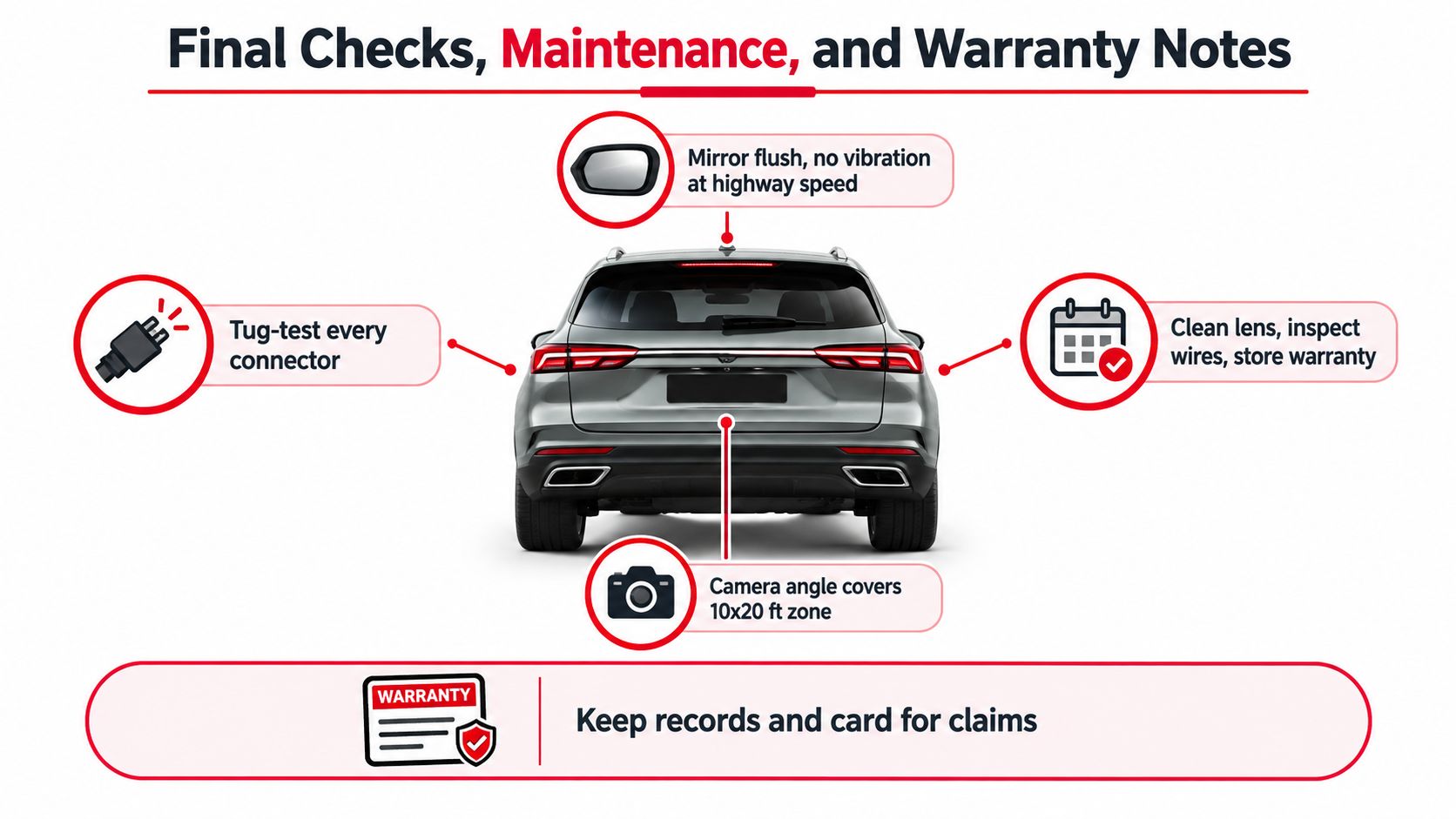
Keep the system dependable
Clean the lens with isopropyl alcohol and a microfiber cloth when dirt or road film affects the image. Inspect the camera gasket for cracking and look for moisture intrusion after severe weather or washing. Check the fuse tap and nearby connections for corrosion, especially if the vehicle sees winter road salt or damp storage.
Record the camera and monitor serial numbers, the installation date, and the retailer's return window. Keep the manual with the vehicle records. Warranty terms vary, so don't assume the electronics and housing receive identical coverage. The plan notes for this installation identify typical coverage of one year for electronics and three years for the mirror housing, but the actual manufacturer's written warranty controls.
A reverse-light splice can also create a warranty dispute if it's poorly made. Solder or a proper sealed crimp with heat-shrink gives the connection a better chance of surviving, but it doesn't guarantee that every portion of the vehicle's electrical warranty remains unaffected. Photograph the finished wiring before closing the trim so a future technician can see what was changed.
Use this guide to clean a backup camera lens when ordinary wiping doesn't remove the film. Store the wiring diagram, installation manual, final photos, and warranty information together.
If you're replacing a damaged camera, mirror, tailgate cable, or related exterior hardware, visit T1A Auto to search parts by vehicle and compare fitment-focused aftermarket options. Match the replacement to your exact truck or SUV before you start routing new wiring, then document the finished installation for easier service later.
